How to submit a termination notice on the Trans.eu Platform
 Updated 2 weeks ago
by
Katarzyna
Updated 2 weeks ago
by
Katarzyna
You can terminate your agreement yourself in your account on the Trans.eu Platform: My company → Product plan → Cancel subscription.
Who can use this feature? The feature is available to all users of the Trans.eu Platform with the authorised user and administrator role. |
Key information
- The agreement is concluded for an indefinite period and remains in force until you terminate it (applies to standard agreements).
- Only an authorised user (company representative) can submit a termination notice.
- The notice period is 1 month, effective at the end of the billing period.
- You will see the termination confirmation and the agreement end date in the Product plan tab.
- CargoON and Enterprise clients submit their termination notice through their account manager.
Who can submit a termination notice?
A termination notice can only be submitted by an employee with the authorised user and administrator role.
Entitled user is a person with extended permissions on the company account. They can represent the company in contacts with Trans.eu and perform activities that require a higher level of access.
How to check who is the entitled user?
- Go to the My company module.
- Open the list of employees.
- Find the person marked with the shield icon.
- Hover over the icon with the cursor. The text Entitled user will appear.
Does the entitled user have to be the person who registered the company?
No. The entitled user can be any employee of the company who is granted this permission in accordance with the rules applicable to the company account.
More information about managing employee accounts can be found in the Employee Accounts article.
Client type | How to submit a termination notice |
Trans.eu Platform client – Authorised User | Yourself on the platform (instructions below). |
CargoON client | This option is not available on the platform. Contact your account manager or write to info@trans.eu |
Enterprise client or client with an individual agreement | This option is not available on the platform. Submit your termination notice in accordance with the terms of your agreement - contact your account manager. |
How to submit a termination notice yourself on the platform?
You can submit a termination notice in a few minutes, without sending any documents. You must be logged in as an authorised user.
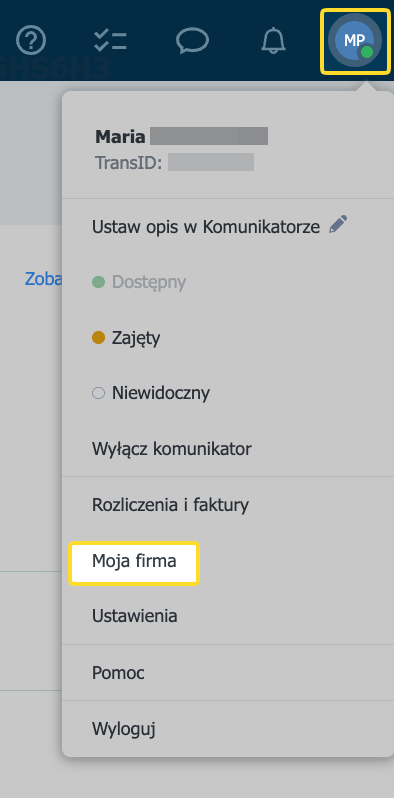
- Click the user profile icon (initials or photo) in the top right corner.
- Select the My company tab.
- Go to the Product plan section.
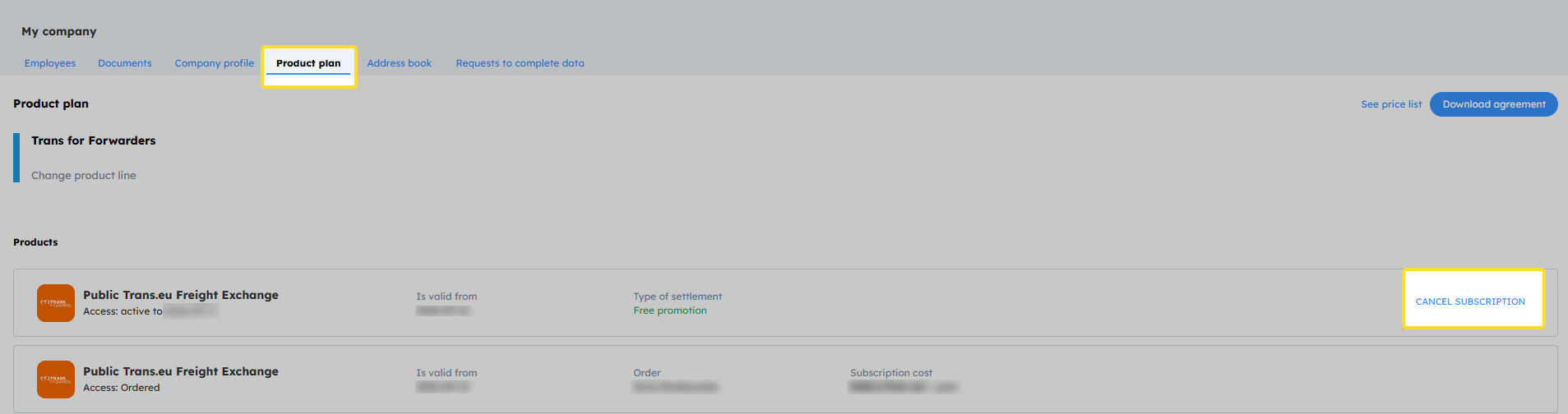
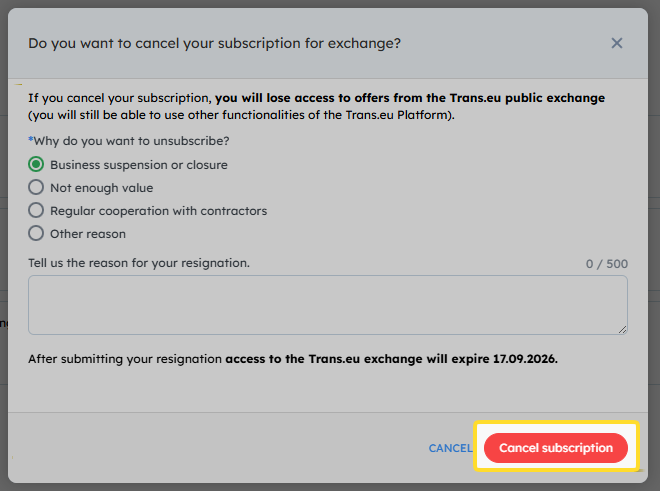
- Click Cancel subscription.
- Select the reason for cancellation and confirm your decision.
How to check if the termination notice has been submitted?
After you submit the termination notice, information about the submitted request and the agreement end date will appear in the Product plan tab.
This confirms that the termination notice has been accepted.
What to do if you cannot submit a termination notice on the platform?
Check which situation applies to you. You can solve most problems without contacting us.
I can't see the "Cancel subscription" option
I don't have permissions
Technical problem (error, no confirmation)
Termination by e-mail
If it is not possible to submit a termination notice via the platform, you can terminate the agreement by e-mail.
Send your termination notice to info@trans.eu
We accept a termination notice that meets one of the following conditions:
- it is sent from the e-mail address assigned to the authorised user's profile or to the company's main account,
- it is a scan of a letter signed by an authorised person or the company owner.
